Admin panel · Launch & Uneekor
Admin panel
Launch & Uneekor
Choose what SimLock starts when a golfer taps Start, offer Advanced Mode, connect SimLock to the Uneekor Launcher, and understand the nightly Launcher restart.
"What SimLock starts when a customer taps Start on a booking, and how it reaches the Uneekor Launcher and GSPro."
This page is in the Simulator group. Its settings are used in Reservation Mode; the GSPro connector path is also used by the In-Session Help menu.
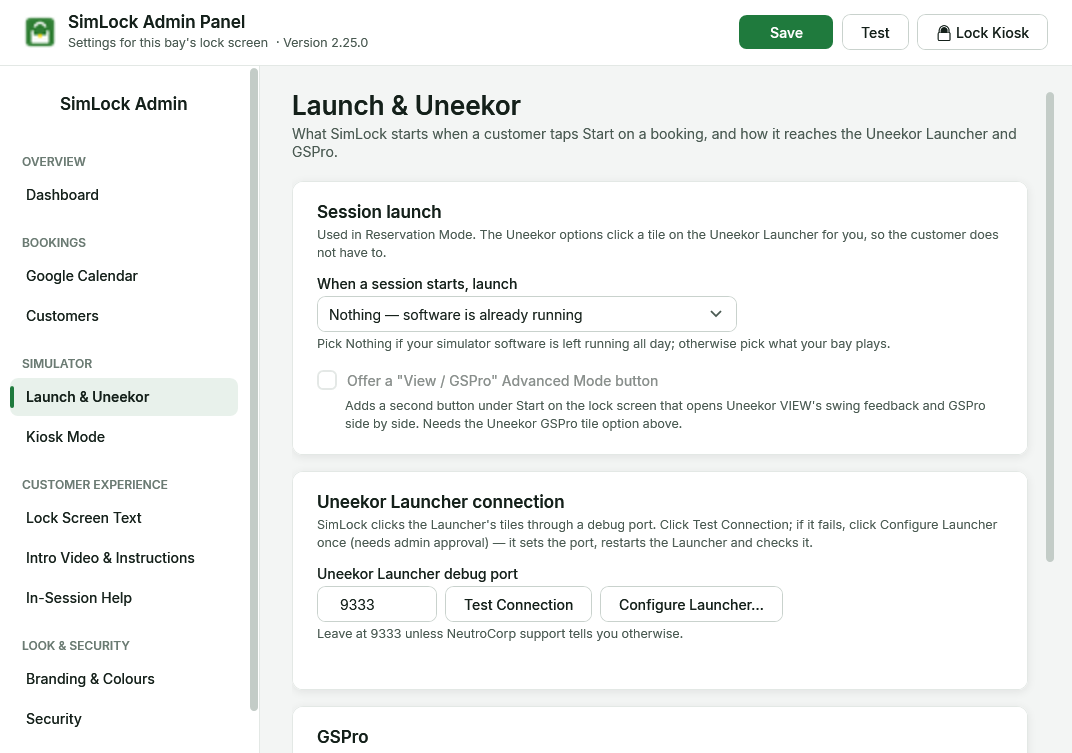 Session launch at the top, then the Uneekor Launcher connection and the GSPro paths.
Choose what starts with the session
When a session starts, launch has four choices. "Pick Nothing if your simulator software is left running all day; otherwise pick what your bay plays."
| Choice | What SimLock does when the golfer taps Start | What it does when the booking ends |
|---|---|---|
| Nothing — software is already running (default) | Nothing. Your own launcher or autostart keeps the software running. | Nothing extra. |
| Uneekor GSPro tile (3rd-party app + GSPro) | Clicks Start Now on the GSPro tile in the Uneekor Launcher, then checks GSPro really started. If the Launcher only waits for GSPro ("Third-party Searching"), SimLock starts GSPro itself. | Clicks Back and Exit in the Launcher so Uneekor closes GSPro and returns to the tile screen; closes GSPro itself if SimLock started it. |
| GSPro only | Starts GSPro program directly. For bays without Uneekor. | Closes GSPro and GSPconnect (GSPconnect would otherwise restart GSPro). |
| Uneekor VIEW + GSPro (both, one Start button) | Clicks the Launcher's Practice tile to start Uneekor VIEW and starts GSPro at the same time, so every session gets VIEW's swing feedback beside GSPro. | Closes GSPro, the GSPro connector and Uneekor VIEW. |
In every mode except Nothing, the GSPro connector window is minimised when it appears so it does not sit on top of GSPro, and the golfer sees the "getting ready" standby screen until the simulator is up (see The lock screen, screen by screen). At session end SimLock also closes the program named on Kiosk Mode, in every mode.
Every step is written to the activity log as session.launch or session.stop; read it on the Dashboard.
Offer Advanced Mode
Offer a "View / GSPro" Advanced Mode button "adds a second button under Start on the lock screen that opens Uneekor VIEW's swing feedback and GSPro side by side. Needs the Uneekor GSPro tile option above." The golfer chooses: Tap to start for a normal GSPro session, or Advanced Mode for VIEW and GSPro together. If you want VIEW for every session, choose Uneekor VIEW + GSPro instead and leave this off.
What SimLock does when a launch fails
With the Uneekor GSPro tile option:
- SimLock clicks the tile, exactly as a person would, and waits for GSPro.
- If the Launcher says Device Not Ready, the launch monitor is off or not connected. SimLock stops there — restarting software cannot fix it — and the golfer sees Please call for assistance with a Try Again button.
- Otherwise, if GSPro has not started, SimLock restarts the Uneekor Launcher and tries once more. If the Launcher visibly ignored the click, it gives up on the first attempt after 10 seconds instead of waiting the full time.
- If that also fails, the log says "GSPro FAILED to launch … Start it manually." with a list of the Uneekor processes. The standby screen lets the golfer go after 60 seconds.
Connect to the Uneekor Launcher
"SimLock clicks the Launcher's tiles through a debug port. Click Test Connection; if it fails, click Configure Launcher once (needs admin approval) — it sets the port, restarts the Launcher and checks it."
| Setting | Default | What it does |
|---|---|---|
| Uneekor Launcher debug port | 9333 |
"Leave at 9333 unless NeutroCorp support tells you otherwise." |
| Test Connection | Checks the port without clicking anything. Success reads "✓ Uneekor Launcher reachable on port 9333". | |
| Configure Launcher… | One-time setup. Windows asks for administrator approval. It removes any machine-wide debug setting, points every scheduled task that starts the Launcher at SimLock's wrapper (Tools\launch_uneekor.cmd) at normal (not elevated) rights, restarts the Launcher and tests again. Takes about 20 seconds — not while a golfer is playing. If it still fails, the setup log is shown and saved at %TEMP%\SimLock-UneekorCdp.log. |
The Uneekor Launcher is a web-based app with no separate GSPro launcher program, so SimLock drives the Launcher's own page through a debug port on this PC only (127.0.0.1).
Things that switch the debug port off
- The Launcher was opened by hand from a desktop shortcut that points straight at
UneekorLauncher.exe. It starts without the port. Restart it with theSimLock-NightlyLauncherRestartscheduled task (or reboot), and point such shortcuts atTools\launch_uneekor.cmd. - The Launcher runs elevated ("as administrator"). It only opens the port when it runs with normal rights. Run Configure Launcher… again; it fixes autostart tasks left at the highest run level.
- Windows logs in as the built-in Administrator account. That account starts everything elevated, so the port never opens. Use a normal Windows account that is a member of Administrators for the bay's auto-login.
Set the GSPro paths
| Setting | Default | What it does |
|---|---|---|
| GSPro program | C:\GSProV1\Core\GSP\GSPro.exe |
"Where GSPro.exe is installed. SimLock starts it directly in the GSPro-only and VIEW + GSPro launch options." Also used when a Uneekor Launcher only waits for GSPro. Browse to change it. |
| GSPro connector program (GSPro's own, not Uneekor Connect) | C:\GSProV1\Core\GSPC\GSPconnect.exe |
"GSPconnect.exe links GSPro to the launch monitor. The in-session help menu's restart-connector action starts it from this path." |
Keep the Launcher healthy: the nightly restart
The Uneekor Launcher can stop responding after several days without a restart: it still looks fine, but clicking a tile does nothing. A restart always cures it, so the installer adds two scheduled tasks:
| Task | When | What it does |
|---|---|---|
SimLock-NightlyLauncherRestart |
Daily at 4:00 AM | Restarts the Launcher through SimLock's wrapper so it always has its debug port. Skips itself if GSPro, GSPconnect, Uneekor VIEW or SwingMx is running. Logs to C:\ProgramData\SimLock\launcher-restart.log. If the restart fails, the activity log shows launcher.restart_failed. |
SimLock-LauncherHealthProbe |
Hourly | Writes the Launcher's state to C:\ProgramData\SimLock\launcher-health.log. Support uses this to see whether the Launcher was healthy before a failure. |
If a booking normally runs over 4 AM, tell support; the task can be moved.
Never reload the Launcher's page
Refreshing the Uneekor Launcher's page signs it out and leaves the bay unable to launch. Only a full restart of the Launcher (the nightly task, or a reboot) fixes it.
Test a bay without a customer
Support can run the real launch path from a command prompt on the bay: SimLock.exe --test-launch (or --test-launch-advanced for VIEW + GSPro). It exits successfully only if the simulator actually started. The launch monitor must be switched on, or the test cannot pass.